MLflow Tutorial: Track Your ML Experiments Like a Pro
MLflow is an open-source platform that tracks everything about your ML experiments — parameters, metrics, model artifacts, and code versions — so you can reproduce any result and never lose a winning configuration again.
Why this matters: Without experiment tracking, most ML engineers waste hours rerunning experiments they've already done — or ship models they can't reproduce. MLflow eliminates both problems permanently.
What you'll do
Before you start
Python 3.8+
Run python --version to check
pip installed
Comes with Python 3.4+
Basic ML knowledge
Know what training and accuracy mean
MLflow is a single pip install. It includes the tracking server, UI, and Python API — no Docker, no cloud setup required.
$ pip install mlflow scikit-learn

Collecting mlflow
  Downloading mlflow-2.x.x-py3-none-any.whl (24.6 MB)
...
Successfully installed mlflow-2.x.x scikit-learn-1.x.x

$ mlflow --version
mlflow, version 2.x.xUsing a virtual environment? Run python -m venv .venv && source .venv/bin/activate before installing.
$ mlflow ui

[2026-04-15 10:23:01 +0000] [12345] [INFO] Starting gunicorn 21.2.0
[2026-04-15 10:23:01 +0000] [12345] [INFO] Listening at: http://127.0.0.1:5000Port conflict? If port 5000 is taken, run mlflow ui --port 5001.
Create a file called train.py and paste this:
import mlflow
import mlflow.sklearn
from sklearn.datasets import load_iris
from sklearn.ensemble import RandomForestClassifier
from sklearn.model_selection import train_test_split
from sklearn.metrics import accuracy_score, f1_score

# Configuration
N_ESTIMATORS = 100
MAX_DEPTH = 5
RANDOM_STATE = 42

# Load data
iris = load_iris()
X_train, X_test, y_train, y_test = train_test_split(
    iris.data, iris.target, test_size=0.2, random_state=RANDOM_STATE
)

# MLflow: name your experiment
mlflow.set_experiment("iris-classifier")

with mlflow.start_run():
    # Train model
    model = RandomForestClassifier(
        n_estimators=N_ESTIMATORS,
        max_depth=MAX_DEPTH,
        random_state=RANDOM_STATE
    )
    model.fit(X_train, y_train)

    # Generate predictions
    predictions = model.predict(X_test)
    accuracy = accuracy_score(y_test, predictions)
    f1 = f1_score(y_test, predictions, average="weighted")

    # Log parameters, metrics, and model
    mlflow.log_param("n_estimators", N_ESTIMATORS)
    mlflow.log_param("max_depth", MAX_DEPTH)
    mlflow.log_metric("accuracy", accuracy)
    mlflow.log_metric("f1_score", f1)
    mlflow.sklearn.log_model(model, "random-forest-model")

    print(f"Accuracy: {accuracy:.4f} | F1: {f1:.4f}")
print(f"Run ID: {mlflow.active_run().info.run_id}")It worked! MLflow created an mlruns/ folder with everything it logged.
Open your browser and go to http://localhost:5000. You'll see the MLflow UI with your experiment listed.
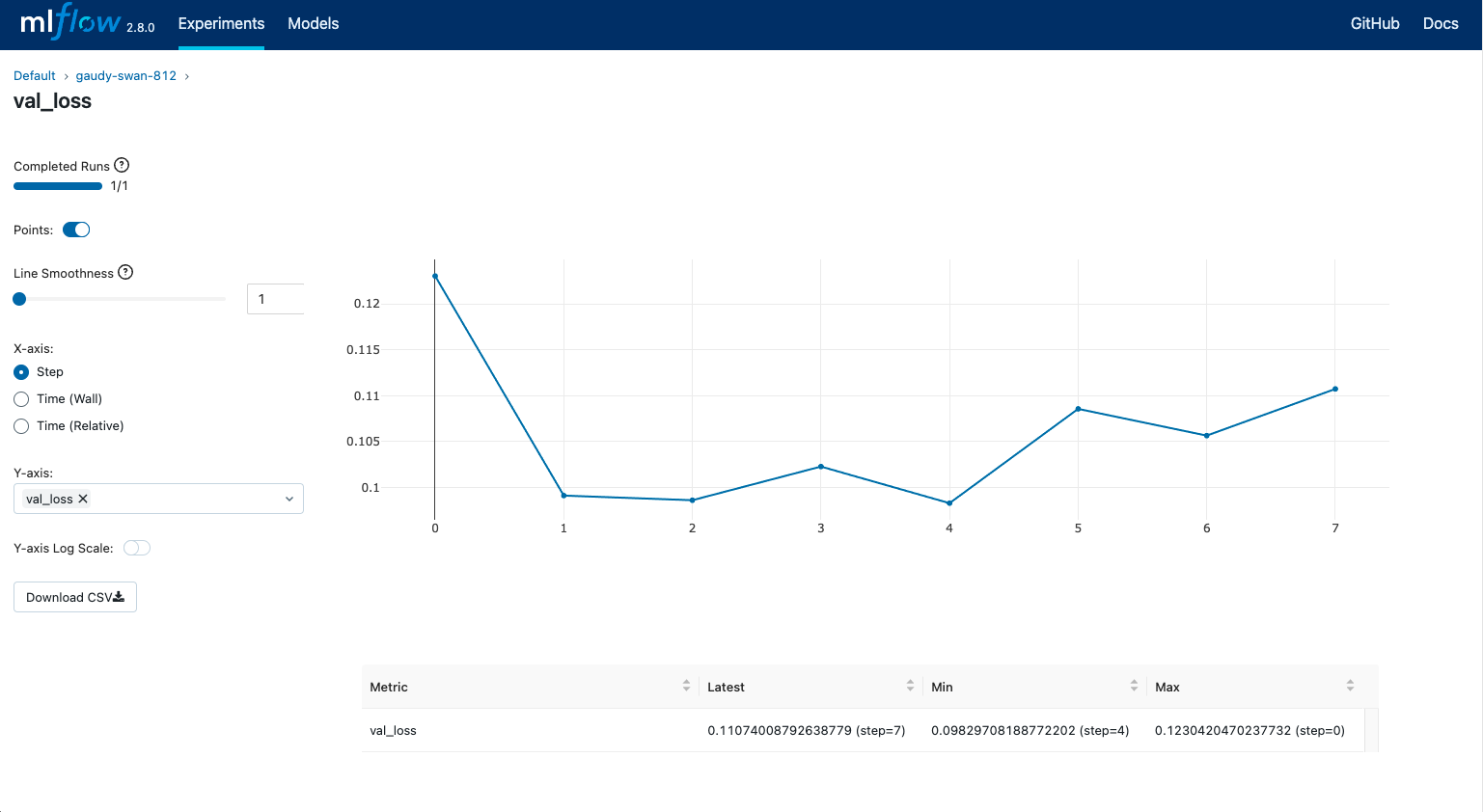
Figure 1: MLflow tracking UI — metrics like accuracy are visualized automatically
Run the script 3-4 times with different parameters. Then in the MLflow UI, select multiple runs and click "Compare".
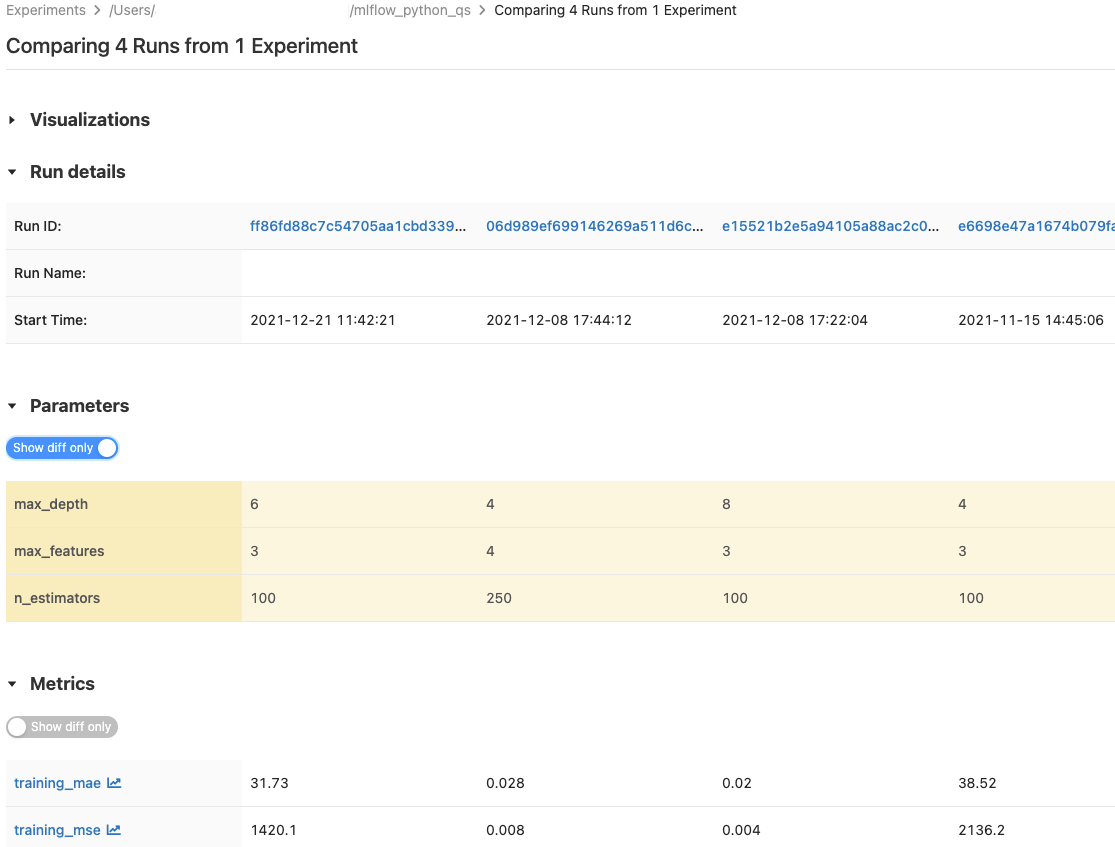
Figure 2: Compare runs side-by-side — MLflow shows which parameters produced the best results
You can now answer: "Which configuration gave us the best result, and can we reproduce it?" — with a single click.
What to learn next
Related articles
Want the full MLflow cheat sheet?
Get a one-page PDF with every MLflow command, all logging APIs, and a production-ready tracking template — free.
No spam. Unsubscribe anytime.