Looking for an honest MLflow vs TensorBoard comparison? This guide breaks down experiment tracking, framework support, model registry, and deep learning visualizations — so you know exactly which tool fits your ML workflow in 2026.
This MLflow vs TensorBoard comparison is based on real hands-on testing. Both tools are free and open source, but they were built for fundamentally different purposes — and choosing the wrong one will leave you fighting your tools instead of training your models.
Table of Contents
MLflow wins for most ML teams in 2026 — framework-agnostic, full platform with experiment tracking, model registry, and deployment. TensorBoard wins for deep learning visualization inside TensorFlow/Keras. For serious production ML, start with MLflow. For TF-only research, TensorBoard is fine. Use both together by logging TensorBoard artifacts as MLflow runs.
01 Why This MLflow vs TensorBoard Comparison Matters
Experiment tracking is non-negotiable for any serious ML project. Without it, you're flying blind — unable to reproduce your best results, compare parameter combinations, or know which code version produced which model. But "just pick one" is bad advice when two tools have fundamentally different design philosophies.
MLflow and TensorBoard are both popular, both open-source, and both widely recommended. The problem is they were built for different purposes, by different teams, solving different core problems. Using TensorBoard when you need MLflow — or vice versa — means fighting your tools instead of training your models.
We compare both tools on framework support, logging capabilities, UI, model management, team collaboration, and production readiness — then give you a clear decision framework based on your actual stack.
02 What is TensorBoard?
TensorBoard is the visualization dashboard that ships with TensorFlow. It was designed specifically to make deep learning training legible — showing you loss curves, accuracy over epochs, weight histograms, and model computation graphs. If you've ever trained a Keras model and wanted to see what was happening inside the network, TensorBoard is what Google built for exactly that.
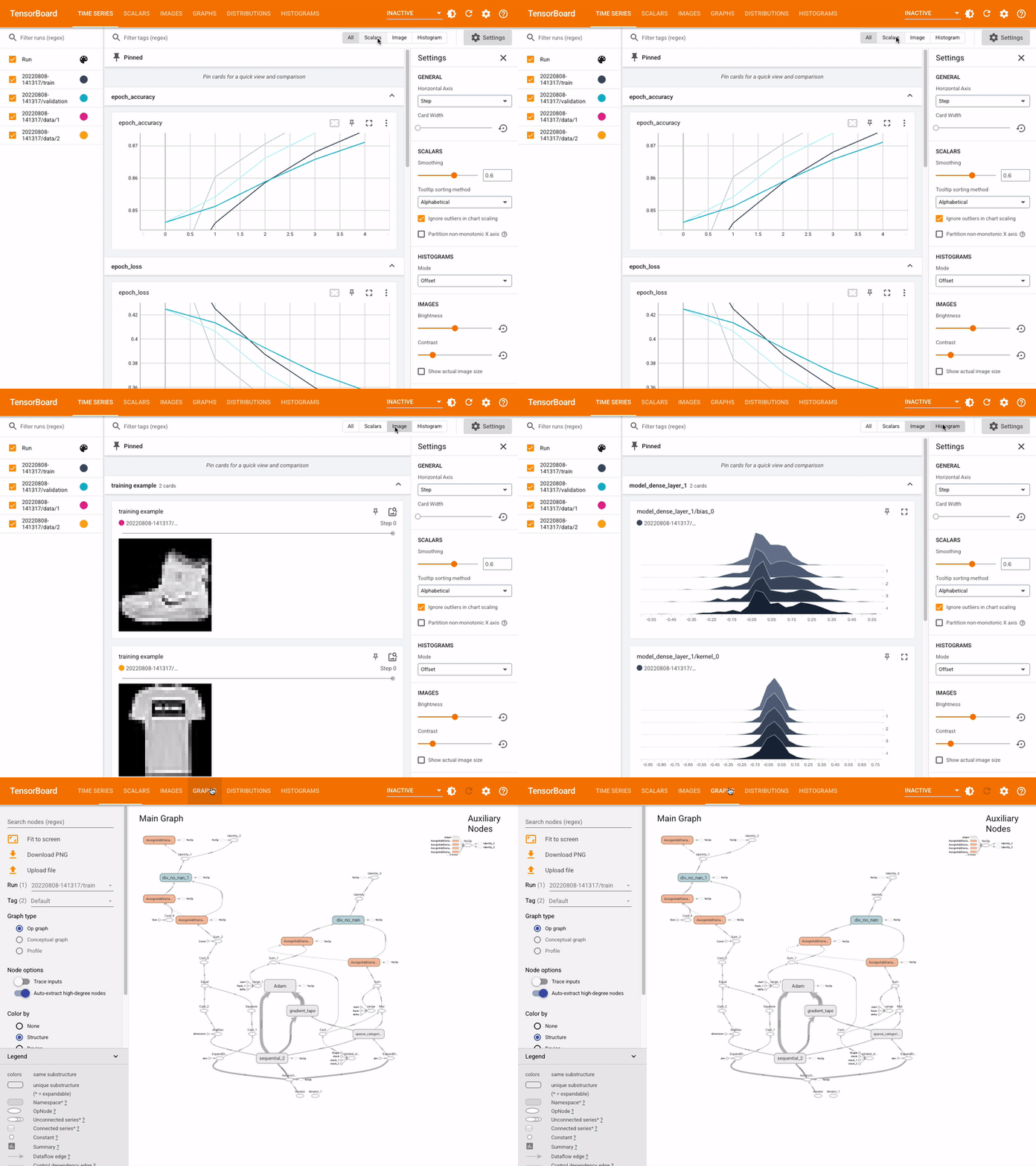
Figure 1: TensorBoard's dashboard — native to TensorFlow for deep learning visualization
Zero setup with Keras callbacks, best-in-class neural network graph visualization, unique embedding projector, and built-in TensorFlow profiler. Works inside Jupyter notebooks with %tensorboard.
Tightly coupled to TensorFlow — poor PyTorch support. No model registry, no artifact storage, no deployment tooling. Difficult to share results across teams. Limited hyperparameter search UI.
03 What is MLflow?
MLflow is an open-source platform for managing the entire ML lifecycle, developed by Databricks and released in 2018. Where TensorBoard visualizes what's happening during training, MLflow tracks everything about every experiment you've ever run — parameters, metrics, code versions, data versions, and the actual trained model artifacts.
Critically, MLflow is completely framework-agnostic. It works identically whether you're using PyTorch, TensorFlow, scikit-learn, XGBoost, LightGBM, Hugging Face, or writing custom NumPy. This makes it the natural choice for any team that uses more than one ML framework — which in 2026 is almost every team.
Works with every major ML framework, full model registry with lifecycle management, one-command model deployment to multiple targets, remote tracking server for team collaboration, and rich artifact storage for any file type.
Requires server setup for team use (no zero-config), no native computation graph visualization, weaker embedding visualization than TensorBoard Projector, heavier setup for pure TF/Keras deep learning work.
04 Head-to-Head Comparison
| Feature | MLflow | TensorBoard | Winner |
|---|---|---|---|
| Framework support | Any — PyTorch, TF, sklearn, XGBoost | TensorFlow / Keras native | ✓ MLflow |
| Setup complexity | pip install mlflow; server for teams
| Built into TF, zero extra config | ✓ TensorBoard |
| Training curves | Yes — metrics logged per step | Yes — smoother, live refresh | ✓ TensorBoard |
| Hyperparameter tracking | Excellent — log_param(), compare all runs
| Basic — HParams dashboard limited | ✓ MLflow |
| Model registry | Yes — full versioning, lifecycle | No — no model registry exists | ✓ MLflow |
| Model deployment | Yes — mlflow models serve, SageMaker, etc.
| No — visualization only | ✓ MLflow |
| Neural net graph viz | No native graph visualization | Yes — best-in-class computation graph viewer | ✓ TensorBoard |
| Team collaboration | Excellent — shared remote server | Poor — log files must be manually shared | ✓ MLflow |
| Reproducibility | Excellent — logs git commit, conda env, all params | Limited — metrics only, no environment capture | ✓ MLflow |
| Use together? | ✓ Yes — log TB events as MLflow artifacts | ✓ Yes | ~ Both |
MLflow has a TensorBoard integration — you can log your TensorBoard event files as MLflow artifacts. This gives you MLflow's experiment management on top of TensorBoard's deep learning visualizations. Many TF-heavy teams do exactly this.
05 Side-by-Side Code Examples
The clearest way to understand the difference is to see both tools applied to the same training script. Here's a simple example:
|
1 2 3 4 5 6 7 8 9 10 11 12 13 14 15 16 17 |
import tensorflow as tf from tensorflow import keras import datetime model = keras.Sequential([ keras.layers.Dense(64, activation='relu'), keras.layers.Dense(3, activation='softmax') ]) model.compile(optimizer='adam', loss='sparse_categorical_crossentropy') log_dir = "logs/" + datetime.datetime.now().strftime("%Y%m%d-%H%M%S") tensorboard_callback = keras.callbacks.TensorBoard(log_dir=log_dir, histogram_freq=1) model.fit(X_train, y_train, epochs=50, callbacks=[tensorboard_callback]) # Launch: tensorboard --logdir logs/ |
|
1 2 3 4 5 6 7 8 9 10 11 12 13 14 15 16 17 18 19 |
import mlflow import mlflow.sklearn from sklearn.ensemble import RandomForestClassifier mlflow.set_experiment("iris-experiment") with mlflow.start_run(): mlflow.log_param("n_estimators", 100) mlflow.log_param("max_depth", 5) model = RandomForestClassifier(n_estimators=100, max_depth=5) model.fit(X_train, y_train) accuracy = model.score(X_test, y_test) mlflow.log_metric("accuracy", accuracy) mlflow.sklearn.log_model(model, "random-forest-model") # Launch UI: mlflow ui # Deploy: mlflow models serve -m "models:/iris-classifier/Production" |
TensorBoard's code is callback-based and automatic — great for Keras. MLflow's code is explicit — you control exactly what gets logged. This makes MLflow more verbose but also more flexible and framework-independent.
06 Which One Should You Choose?
- Your team uses PyTorch, scikit-learn, or any non-TF framework
- You need to track and compare many experiments across a team
- You want to version and deploy models to production
- You're building a multi-framework ML platform
- Reproducibility and audit trails matter to your organization
- You want a remote tracking server that scales to a team
- Your entire project uses TensorFlow / Keras — no other frameworks
- You're doing research on model architecture and need graph visualization
- You need embedding / dimensionality reduction visualization
- You want per-step weight histogram tracking during training
- You're solo or in a small research team with no deployment needs
For most ML engineers in 2026, MLflow is the right choice. The industry has moved heavily toward multi-framework stacks (PyTorch for research, sklearn for tabular, HuggingFace for NLP) and toward treating models as deployable artifacts — both of which are MLflow's strong suits. TensorBoard remains the best tool for one specific job: visualizing what's happening inside a TensorFlow neural network during training.
07 Final Verdict & Scores
Category-by-category breakdown
- Framework support: 10/10
- Experiment tracking: 9/10
- Model registry: 10/10
- Team collaboration: 9/10
- Deployment tooling: 9/10
- DL visualizations: 4/10
- Framework support: 5/10
- Experiment tracking: 6/10
- DL visualizations: 10/10
- Setup simplicity: 10/10
- Model registry: 1/10
- Team collaboration: 4/10
08 Frequently Asked Questions
Can I use MLflow with TensorFlow?
Yes — MLflow works with TensorFlow through the mlflow.tensorflow module or the generic mlflow.log_metrics() and mlflow.log_params() APIs. You can also log TensorBoard event files as MLflow artifacts to get the best of both worlds.
Is TensorBoard only for TensorFlow?
TensorBoard is tightly coupled to TensorFlow, but PyTorch has limited support via torch.utils.tensorboard.SummaryWriter. However, the experience is much less polished than with TensorFlow/Keras. For PyTorch-first teams, MLflow is the better choice.
Which is better for production deployment?
MLflow — hands down. TensorBoard has no model registry, no deployment tooling, and no artifact storage. MLflow's mlflow models serve can deploy a model as a REST API in one command, and the Model Registry manages staging/production lifecycle.
Can I use both MLflow and TensorBoard together?
Yes — and many teams do. Use TensorBoard callbacks during training for deep learning visualizations, then log the entire TensorBoard log directory as an MLflow artifact. This gives you TensorBoard's DL visuals inside MLflow's experiment tracking and model registry.
What's the learning curve for each tool?
TensorBoard is extremely easy to start with — one Keras callback and you're logging. MLflow requires a bit more setup (understanding runs, experiments, artifacts), but the learning curve is still shallow. Most engineers get productive with MLflow in an afternoon.
📖 External resources: MLflow Documentation • TensorBoard Documentation • MLflow GitHub